SoloCoach allows me to quickly find quality drills and put them in a simple format to use for practice.
I don't have to create a form for my practice plan and try to time everything out. SoloCoach already does that for me.

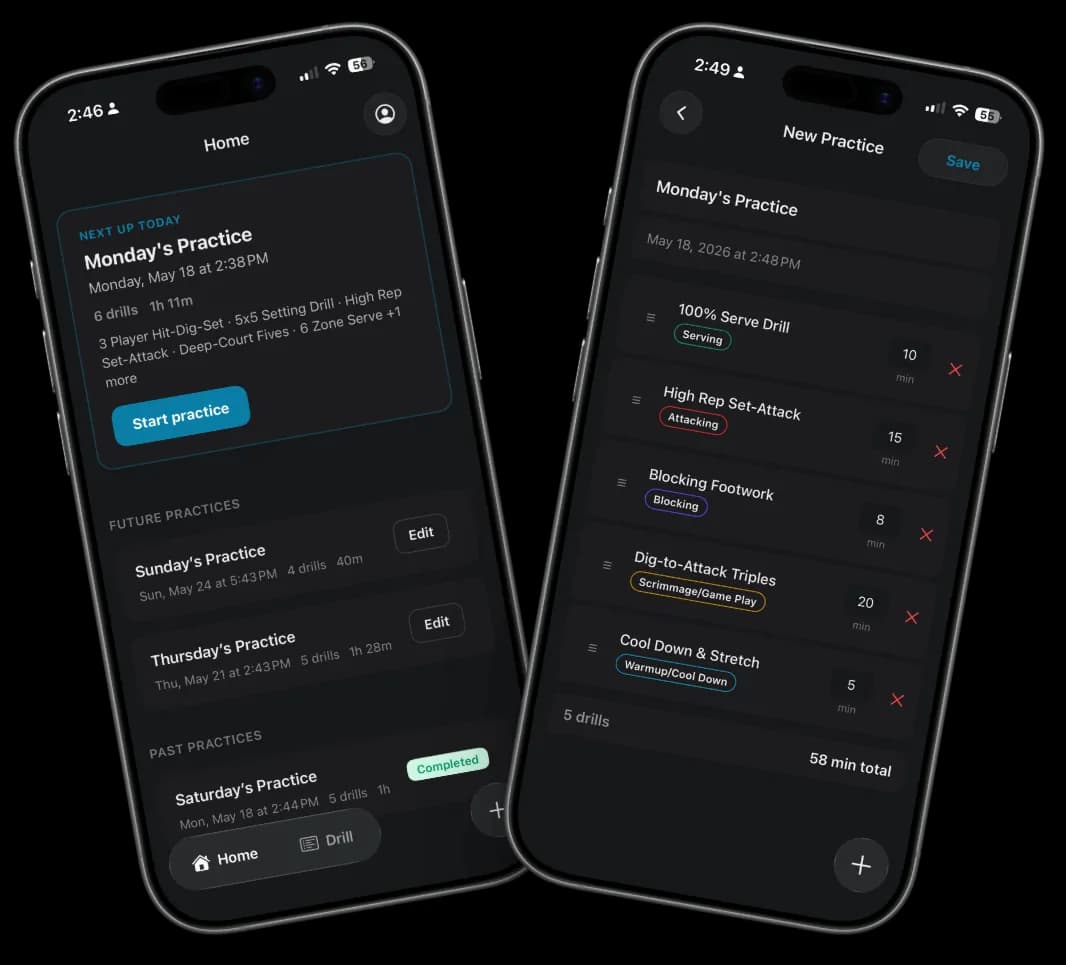
What is SoloCoach Volleyball Practice? SoloCoach Volleyball Practice is a volleyball practice planning app for coaches. Build a timed session from 149 drills, run it from your phone with a countdown, and share a recap when practice ends. Free on the App Store and Google Play.
149 drills built in
Run bettervolleyball practices.Starting today.
Start from 149 built-in volleyball drills or add your own, build a session in minutes, and run it live from the court without rebuilding every plan from scratch.


4.9 · 7 ratings on the App Store
Downloaded by 2,500+ coaches
Comparing coaching apps? Volleyball coaching app overview
Coach testimonials
As a high school coach, practice planning can easily consume hours every week. Solo Coach has dramatically simplified that process for me. Instead of building every practice from scratch, I can quickly create organized, purposeful plans tailored to exactly what my team needs.
I've tried many different volleyball practice planning apps, and SoloCoach is by far the easiest to use with the most functionality during an actual practice. It's simple to build a plan and just as easy to run it live, which makes a big difference as a coach. It makes planning and running practices a lot smoother.
I love using SoloCoach for how comprehensive and easy it is to use! I can put all my drills in one place, keep track of all my drill times and even keep score all while running the practice on the app. It truly is a fantastic supplement to help better organize and manage practices with a busy schedule.
The preloaded drill library has sparked new ideas, and adding my own drills was quick and intuitive. Having a searchable library of drills organized by skill, position, and duration at my fingertips allows me to adjust practice plans on the fly when numbers, space, or time change at the last minute.
This is one of the few coaching tools I've used that I immediately wanted to incorporate into my regular routine and recommend to other coaches. It saves time, improves organization, and helps me focus more on coaching and less on planning.
SoloCoach use cases
Drill Library
149 drills, built in.Find the right one fast.
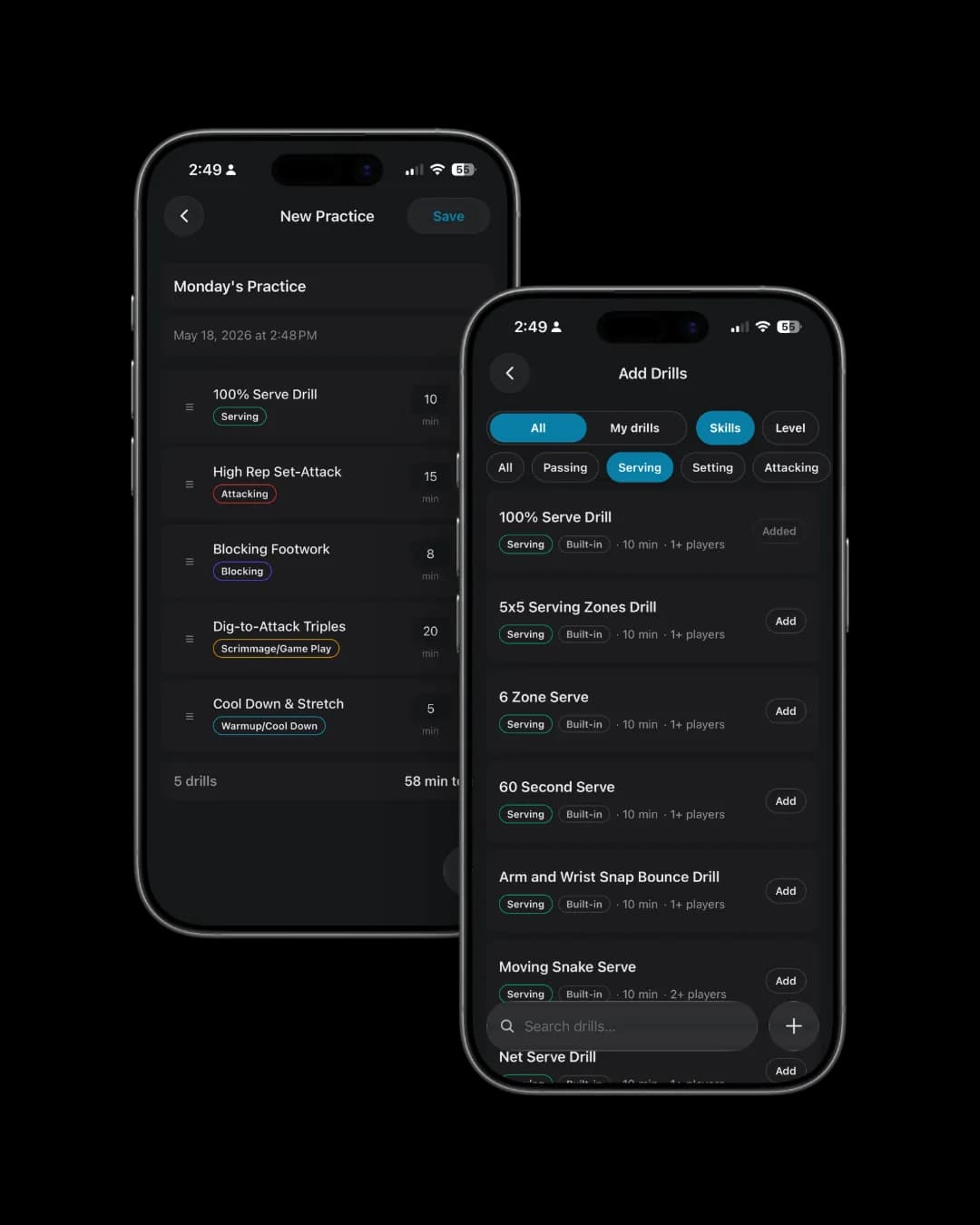
SoloCoach ships with 149 ready-to-run drills across passing, serving, attacking, blocking, and defense, so your first practice doesn't start from a blank page. Filter by level, duration, or skill, see player count and focus before you add a drill, and add your own drills alongside them.
149 Drills · Filter by Skill & Duration · 5 Skill Pillars
Plan Builder
Build a complete practice planin minutes.
Open SoloCoach, tap New Practice. Browse the drill library by skill. Tap to add, player count, duration, and focus are right there. Reorder, remove, adjust until the plan is right. The running time total updates as you build so you never over-plan your court time.
Build in Minutes · Duplicate Previous Sessions · Templates (Pro)
Run Screen
Run your practice with confidence.No more clipboard juggling or clock-watching.
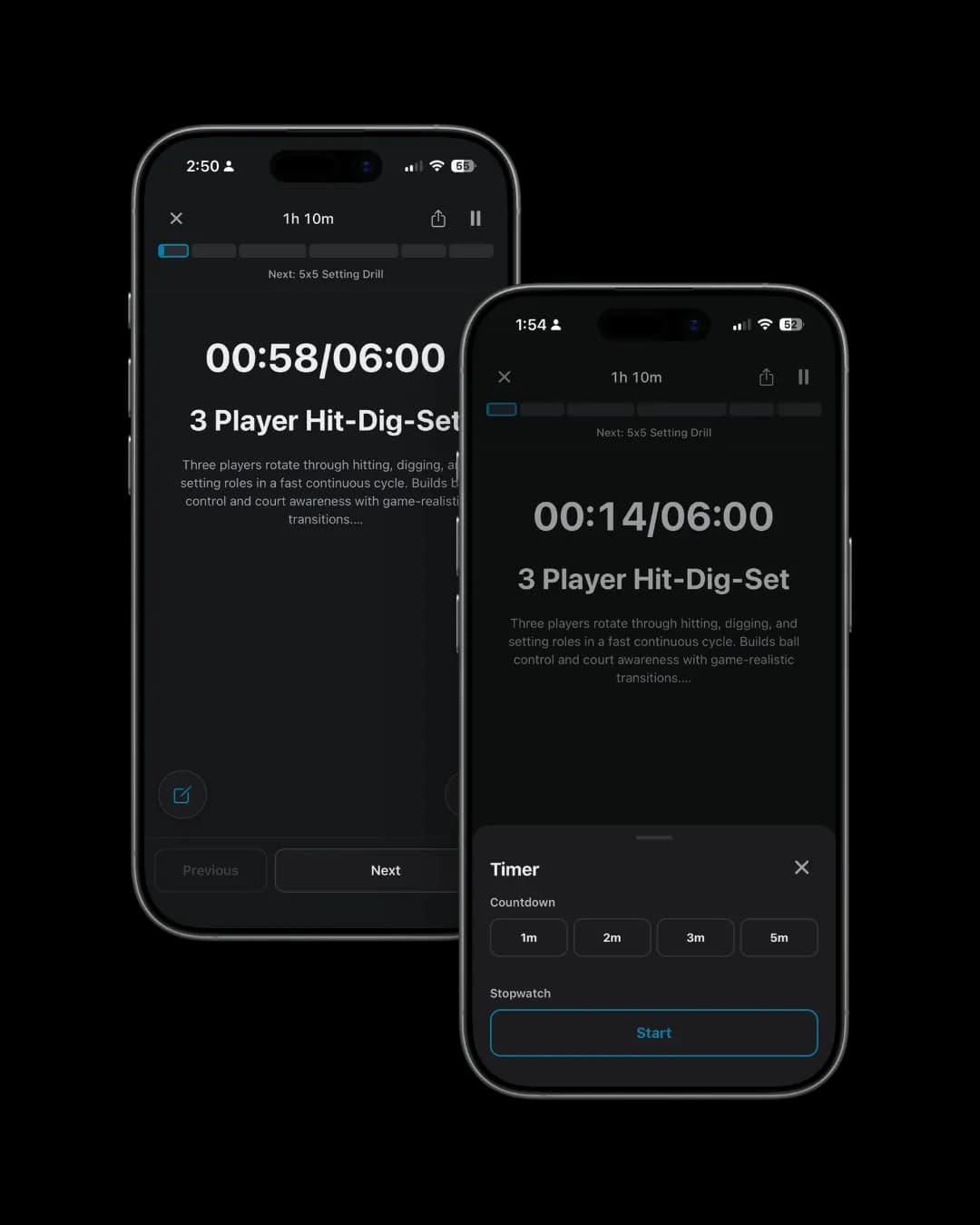
You know the moment, drill's running, you're holding a clipboard, glancing at notes, trying to remember what's next. SoloCoach replaces all of that with one screen: current drill, countdown timer, next drill already queued.
Tap to advance when the timer ends. The phone keeps the session moving. You keep your eyes on your players.
Recap & Share
Share the recap beforeyou leave the gym.
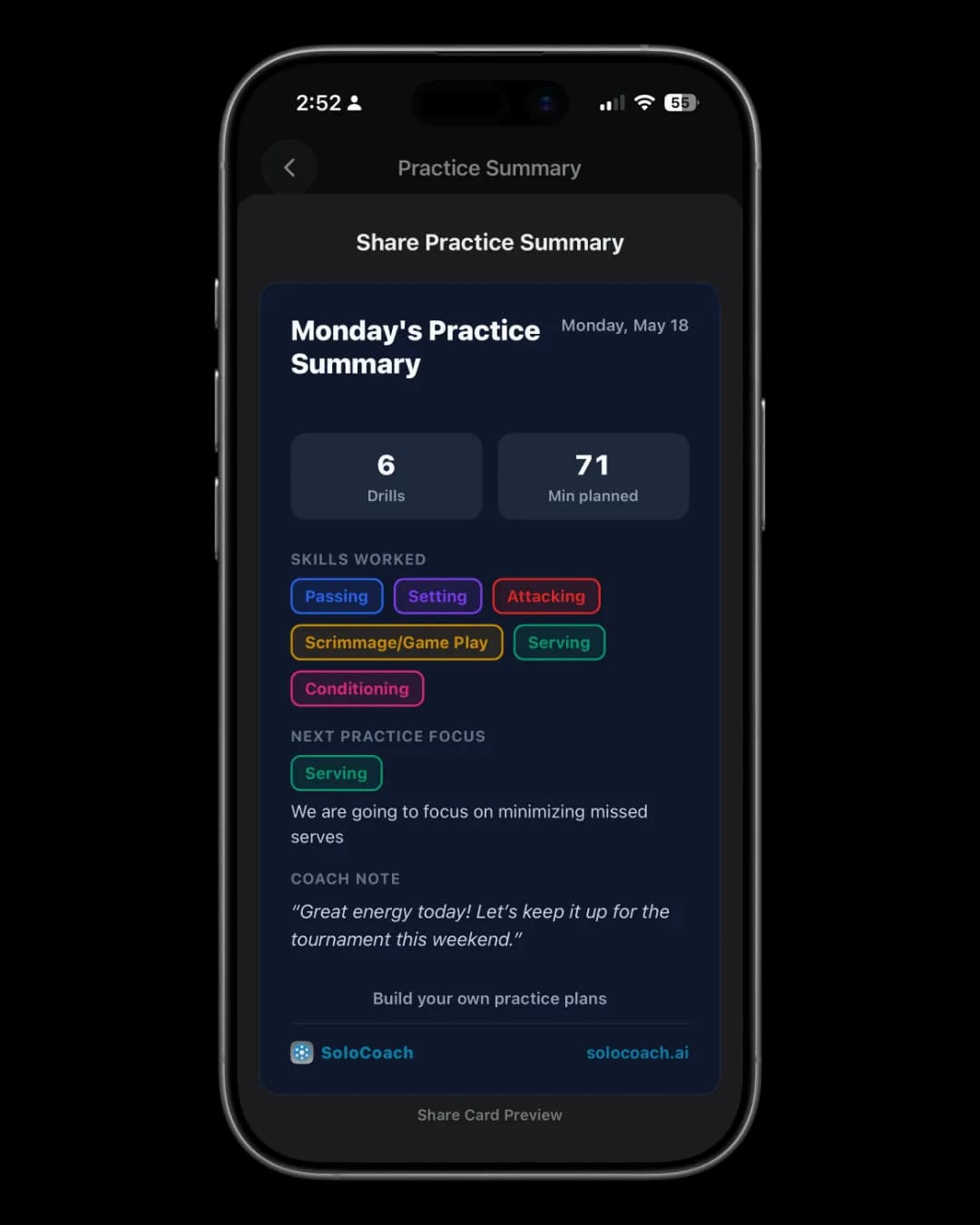
Every practice ends with a summary, drills run, total court time, skill breakdown by category. One tap generates a shareable recap card: drill list, skill focus, session length, and space for a coach note.
Screenshot it. Drop it in the parent group chat. Send it to your players. Coaches who share recaps after every session report parents are more engaged and players arrive at the next practice knowing what to expect.
Build the session. Run it. Share it. All from one device, before you leave the gym.
How it works
Three steps. First practice.
Step 01
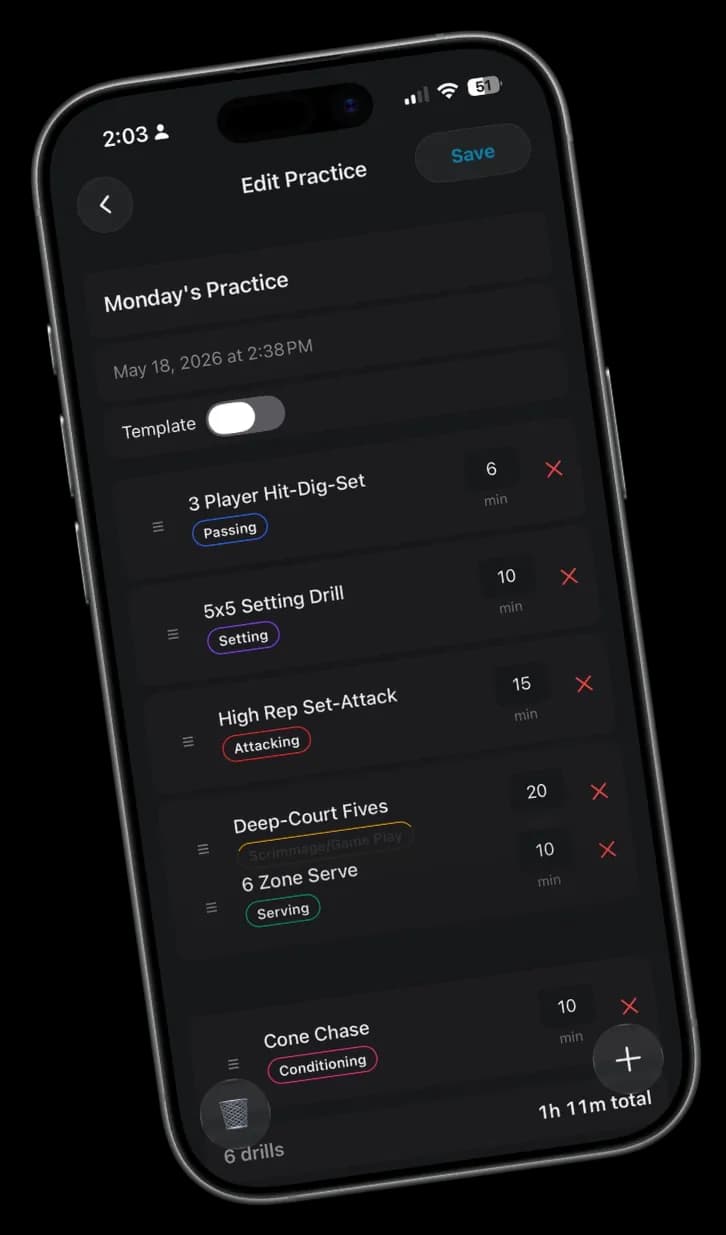
Build your session
Browse 149 drills by skill. Tap to add, reorder until it's right. Save. Your court time is planned.
Step 02
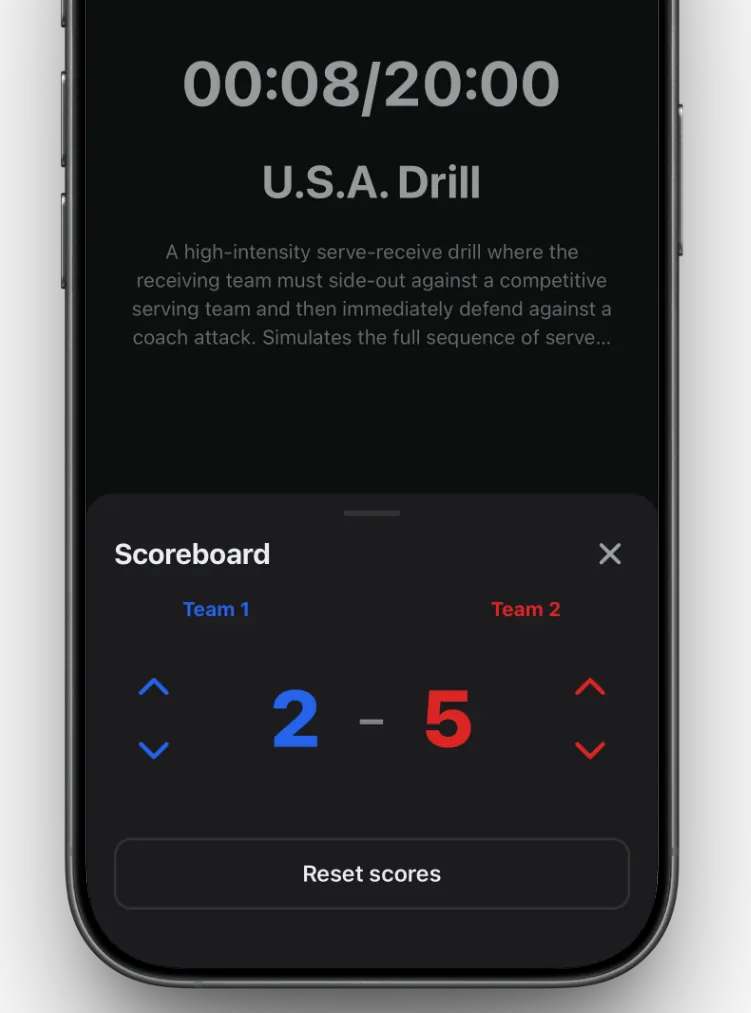
Run it from the court
Hit Run Practice. The timer takes over, current drill on screen, next drill queued. No paper. Just coaching.
Step 03
Recap and share
Practice summary is automatic. Rate your drills, screenshot the recap card, send it to the team. Done before you leave the gym.
Build it. Run it. Share it.
4.9 · 7 ratings on the App Store
Downloaded by 2,500+ coaches
Frequently asked questions
- Who is SoloCoach for?
- Any volleyball coach who plans practices, youth and rec, club and travel, and high school. SoloCoach helps you organize drills, build sessions quickly, and run practice live from the court with a built-in timer.
- What does SoloCoach do differently from a notes app?
- SoloCoach keeps your drill library organized by skill pillar, builds plans with automatic total duration, and runs live in the gym, current drill on screen, countdown timer, next drill queued. When practice ends, you get a recap card to share with parents and players.
- What is a volleyball coaching app?
- A volleyball coaching app helps coaches plan practices, organize drills, and run sessions from a phone. SoloCoach does that in one place: a drill library, a plan builder with time targets, and a live run mode for the gym.
- Is SoloCoach free?
- SoloCoach is free to download on the App Store and Google Play. Core practice planning and the live run screen are included. Pro features like templates and advanced library tools are available with a subscription.
- How many drills are included?
- SoloCoach ships with 149 platform drills organized across five skill pillars, passing, serving, attacking, blocking, and defense. Rate drills after practice and SoloCoach builds a personalized library over time.
- Is SoloCoach available on Android?
- Yes. SoloCoach is on the App Store for iPhone and iPad, and on Google Play for Android. Subscribe in the app on each platform, a subscription on one does not unlock the other.